Styling
Show and hide, in every view or in one
Each row's eye shows or hides what it stands for — in all views at once, or in the active view only — starting from what the 3D model itself shows.
The eye
A hidden object is not drawn at all in the view: no line, no fill, it hides nothing and casts no shadow. A row's eye acts on the row and on everything inside it.
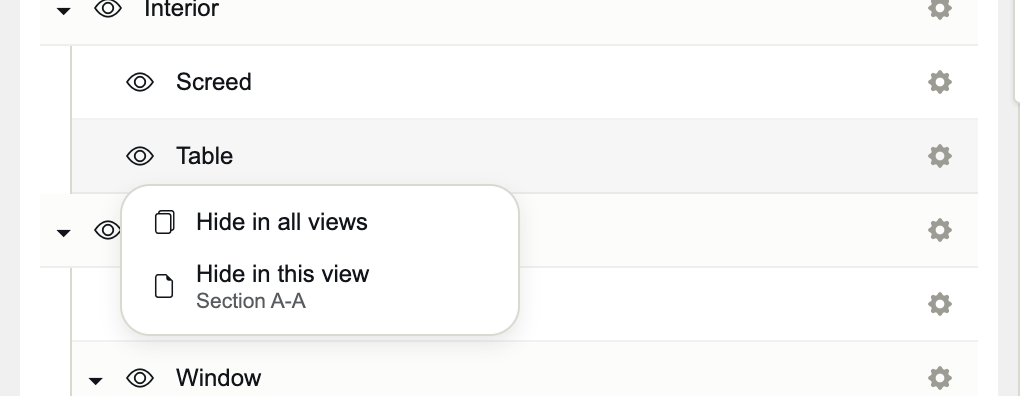
- Hide / Show in all views
- The object's state in every view. It also clears the choices views made on their own, as the menu warns.
- Hide / Show in this view
- A choice for the active view only, named under it: a piece of furniture shown in the plan and hidden in the sections.
- As in the model
- Forgets every choice and follows the 3D model again. Offered when the model hides something under the row.
With no active view, the eye acts at once in all views. A small dot on an eye means the active view decides otherwise than all views; the eye's tooltip says how.
What the model hides
What SketchUp or Blender does not display — a hidden group, a tag turned off, a collection hidden with its eye — is hidden in Occlusia too, by default. Its name is shown in grey italics, and its tooltip ends with “hidden in the model”. Its eye can still show it, in all views or in one; As in the model gives it back to the model.
Sections, annotations and spot elevations
- SECTIONS: the eye shows or hides the section's marker in the other views, in all views at once. The current view's own eye is locked.
- ANNOTATIONS: the eye shows or hides the note in every view.
- SPOT ELEV.: the same menu as objects. In a plan, spot elevations are never drawn, and their eyes are shut.
Several rows
Click the eye of a selected row, and the choice applies to every selected row.